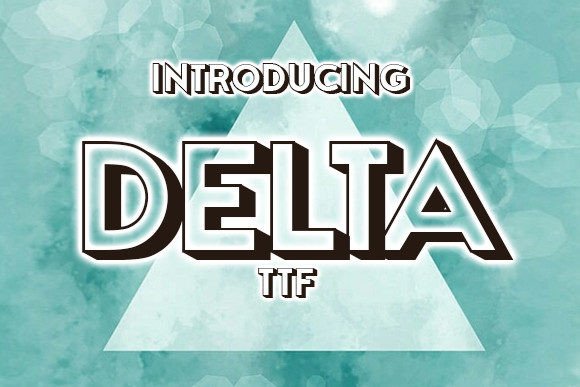
Unlocking the Potential of Delta: A Guide to Mastering This Elegant 3D Font
There is a specific moment in the design process where a project shifts from "good" to "unforgettable." Often, that shift happens not because of a complex layout or a revolutionary color palette, but because of typography. Delta is one of those typefaces that commands attention immediately. As an elegant 3D font, it brings depth, dimension, and a modern aesthetic to any surface it touches. Whether you are crafting a poster for a local music festival, designing flyers for a real estate open house, or printing custom t-shirts for a startup brand, Delta offers the visual weight needed to make your message stand out. However, possessing a powerful tool does not guarantee a masterpiece. Many creators, from seasoned professionals to enthusiastic beginners, stumble when integrating 3D typography into their work. The difference between a polished, professional result and a cluttered, amateurish one often lies in how you handle the nuances of the font itself.
The Allure and Misunderstanding of Dimension
At its core, Delta is designed to pop. Its three-dimensional structure mimics physical objects, casting shadows and creating highlights that suggest volume. This makes it incredibly effective for headlines and short, punchy statements. The problem arises when designers treat Delta like a standard flat font. A common mistake is attempting to use it for body text or long paragraphs. Because 3D fonts rely on intricate details to create their illusion of depth, they become visually noisy and difficult to read at smaller sizes. If you try to write a full paragraph of event details in Delta, your audience will likely skim right over it, frustrated by the lack of legibility.
The better approach is to respect the hierarchy. Use Delta exclusively for headers, titles, or key call-to-action phrases where you want maximum impact. Pair it with a clean, sans-serif font for the supporting information. This contrast allows Delta to shine as the star of the show while ensuring your message remains clear and accessible. Think of Delta as the spotlight on a stage; it should illuminate the main actor, not flood the entire theater so brightly that no one can see the performance.
Navigating Color and Background Choices
Another area where many users miss the mark is color selection. Since Delta already possesses built-in shading and highlights to create its 3D effect, adding too many additional colors or gradients can muddy the design. Beginners often feel compelled to apply a rainbow gradient or a busy texture to the letters, thinking it adds excitement. In reality, this often destroys the carefully crafted lighting of the font, making the text look flat or chaotic.
To maintain the elegance of Delta, stick to solid, bold colors that contrast sharply with your background. If you are designing a flyer, ensure there is ample negative space around the text. Crowding a 3D font against other graphical elements or busy images causes visual friction. The shadows inherent in Delta need room to breathe. If you place it directly over a photograph without a separating layer or drop shadow, the text may get lost in the background noise. A simple solution is to add a subtle outline or a semi-transparent shape behind the text to separate it from the imagery, preserving the integrity of the 3D effect.
Application Across Different Mediums
One of the most compelling features of Delta is its versatility across physical and digital mediums, but each medium requires a different technical approach. A frequent oversight occurs when designers take a screen-optimized design and send it straight to print, or vice versa. For t-shirts and apparel, the thickness of the lines in a 3D font matters immensely. If the fine details of Delta's shadows are too thin, they may not transfer well during screen printing or heat pressing, resulting in broken lines or filled-in gaps.
Before finalizing a design for merchandise, always check the minimum line weight requirements of your printer. You may need to slightly simplify the design or increase the overall size of the text to ensure the 3D details remain crisp on fabric. Conversely, when using Delta for digital posters or social media graphics, be mindful of file size and rendering. High-resolution 3D effects can sometimes cause lag or pixelation if not exported correctly. Always preview your designs on the actual device or material they will be viewed on. What looks sharp on a retina display might look jagged on a budget smartphone or blurry on a cheap flyer stock.
Licensing and Sourcing: Avoiding Legal Pitfalls
Beyond the visual aspects, there is a critical administrative step that many creators overlook: licensing. The internet is flooded with "free" fonts, but using a font without verifying its license can lead to significant legal and financial headaches down the road. Just because you can download Delta does not mean you have the right to use it for commercial purposes. Some licenses restrict usage to personal projects only, meaning you cannot use the font on a t-shirt you intend to sell or a flyer for a paying client.
Always read the End User License Agreement (EULA) before installing or using the font. If you are an entrepreneur or freelancer, investing in a proper commercial license is non-negotiable. It protects your business and ensures the original type designer is compensated for their work. Furthermore, downloading fonts from unverified third-party sites can expose your computer to malware or result in corrupted font files that render incorrectly. Stick to reputable foundries or official marketplaces to ensure you are getting the high-quality, complete character set you expect.
Refining Your Workflow for Better Results
To truly elevate your designs with Delta, consider these practical checks before hitting publish or print:
- Test Legibility: Step back from your screen or print a test copy. Can you read the headline instantly? If you have to squint, simplify the background or increase the spacing.
- Check Contrast: Ensure the color of the font stands out distinctly against the background. Low contrast kills the 3D effect.
- Verify Licensing: Confirm your intended use (commercial vs. personal) matches the license terms.
- Pair Wisely: Choose a secondary font that complements Delta without competing with it. Simple is usually better.
- Mind the Medium: Adjust line weights and resolution based on whether the final output is digital or physical.
Design is as much about what you choose not to do as it is about what you include. By avoiding the traps of over-complication, poor contrast, and improper licensing, you allow Delta to do what it does best: bring your ideas to life with style and substance. Whether you are a blogger looking to spice up a header image or a small business owner branding a new product line, treating this font with intentionality will yield results that look professional and feel premium. Take the time to understand the tool, respect its limitations, and apply it with confidence. Your audience will notice the difference.